
Blog Post: The Viral “Filmmaker Prompt Framework” Is Brilliant. Here’s How We Made It Executable.
Let me walk you through this as if I were writing it myself — because honestly, reading that X thread felt like reading my own notebook from six months ago.
The Moment I Saw That Thread
When I first scrolled past @beginnersblog1’s post, I didn’t think “great content, let me share it.” I thought “finally, someone is saying what I’ve been trying to build for months.”
If you haven’t seen it, the tweet breaks down a filmmaker prompt framework:
INTENT → SUBJECT + ACTION → FRAME → OPTICS → CAMERA → PERFORMANCE + PHYSICS → LIGHT + SPACE → CONTINUITY
And then walks through all eight. It’s a genuinely excellent piece of writing. It’s also — and I mean this as a compliment — a cheat sheet.
A cheat sheet tells you what to do. It doesn’t do it for you.
That gap is exactly where I’ve been living for the past six months.
Stop rewriting the same character description for every shot.
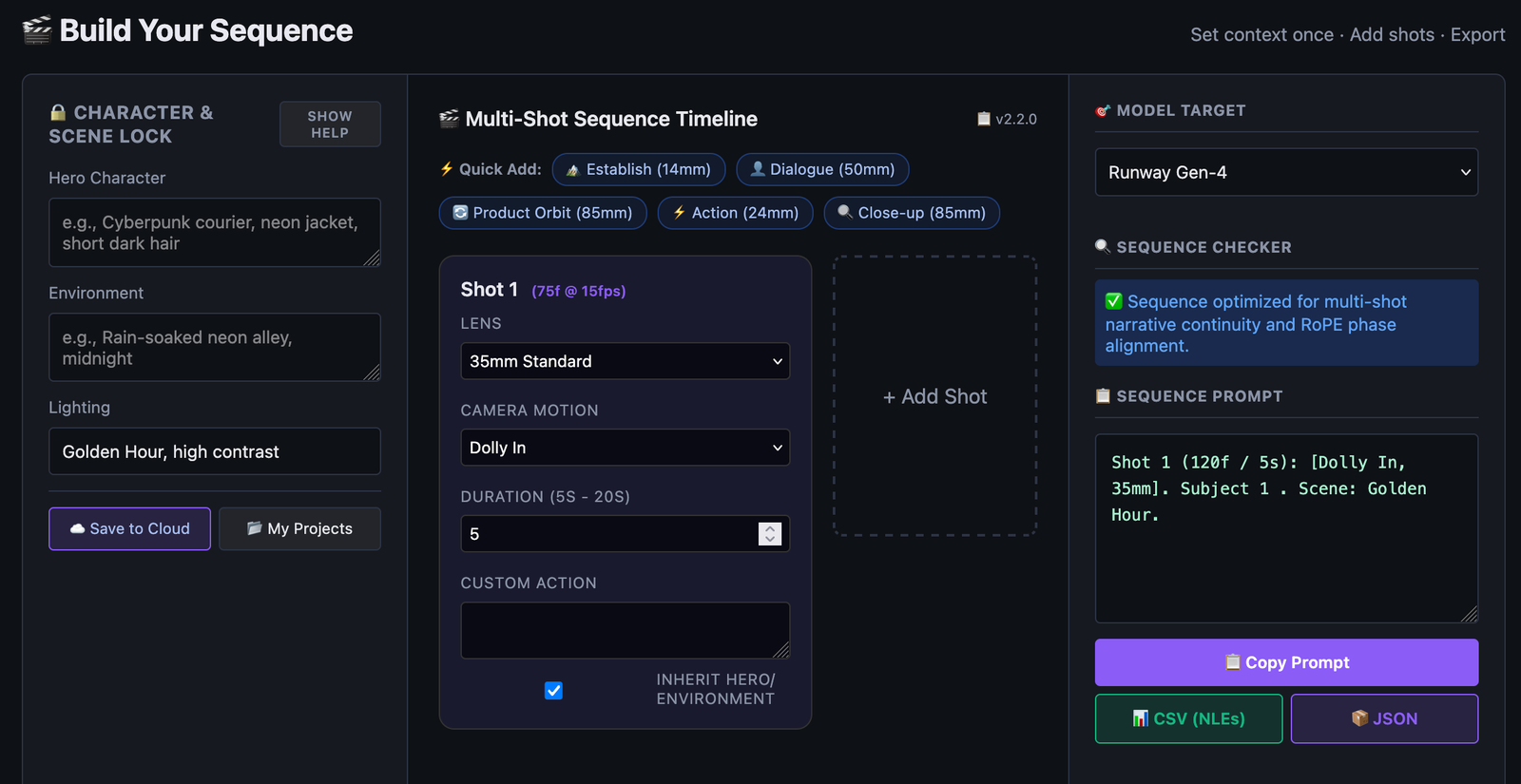
The AI Video Sequence Builder lets you lock your character, environment, and lighting once, then plan up to 6 connected shots with individual camera movements, lenses, and durations. It checks your sequence for continuity problems before you generate, and exports structured prompts for Seedance, Kling, Runway, Sora, or Veo.
Free to use · No signup required · Takes about 30 seconds to try
What the Framework Gets Absolutely Right
Before I say anything else, let me be honest about this: the framework is correct.
Not “correct for a tweet” — correct as an actual filmmaking discipline. If you’ve spent any time on a real set, you’ll recognize every single point:
- Intent matters more than camera language. A shot with no purpose can’t be saved by a dolly move. I’ve watched directors spend an hour blocking a scene before anyone even discusses the lens. There’s a reason.
- “Man is scared” is not direction. “He freezes at the doorway, eyes tracking toward the sound, shoulders tightening before he slowly steps backward” is. Anyone who’s worked with actors knows the difference immediately.
- Lens choice is a decision, not a decoration. Picking 35mm because it “sounds cinematic” is the visual equivalent of writing “beautiful” in a script. It means nothing.
- One shot. One beat. This is the rule I’ve watched people break the most — especially in AI video, where the temptation to cram more into a prompt is overwhelming. Every clip I’ve seen fail has failed because someone tried to fit an entire scene into 8 seconds.
So when I say the framework is brilliant, I mean it. It’s the best short-form summary of filmmaking discipline I’ve read in a while.
But — and this is the whole reason my tool exists — there’s a difference between knowing the framework and executing it.
Where the Framework Leaves You Stranded
Here’s the thing nobody talks about when they share frameworks like this:
You still have to type it all out. Every single time.
If you’re generating a five-shot sequence, you’re going to write a prompt that includes:
- Subject description
- Action description
- Frame and angle
- Lens choice and reasoning
- Camera movement
- Performance notes
- Physics notes
- Lighting description
- Continuity details
…and then you’re going to do it again for shot 2. And shot 3. And shot 4. And by shot 5, you’re going to skip the continuity details because you’re tired, and shot 5 will look nothing like shot 1.
I’ve done this. I’ve done it many times. And every time, I’ve thought the same thing: this is not a prompt problem. This is a systems problem.
The framework tells you what to write. Nothing in the framework tells you how to keep from writing the same things over and over.
That’s what I built.
What I Actually Built
I built two tools, and they map directly to the framework in that thread.
The Cinematic Single-Shot Composer
For one shot. If you’ve got a scene in your head and you want to direct it properly, this is where you go.
You pick your lens. You pick your camera movement. You set the lighting. You describe the action. You add the performance notes. The tool takes care of the ordering, the technical syntax, and the structure — you focus on the creative decisions.
In framework terms, this handles steps 2–7 (Subject + Action → Frame → Optics → Camera → Performance + Physics → Light + Space).
You still bring Intent (step 1). Because no software knows why you want this shot.
The Multi-Shot Sequence Builder
For sequences. This is the one I’m proudest of, and it’s the one that solves the problem the framework raises but can’t solve on its own.
Here’s how it works:
- You lock your character, environment, and lighting once. Describe your character’s appearance, their clothing, the location, the time of day, the lighting mood — all of it, once.
- You build up to six shots. Each shot gets its own camera movement, lens, duration, and action — but every shot inherits the locked context automatically.
- The tool checks the sequence for common problems — aggressive camera movement combined with too-short duration, abrupt lens changes, continuity issues. It flags them before you spend credits finding out.
- You export structured prompts for whatever model you’re using — Seedance, Kling, Runway, Sora, or Veo.
In framework terms, this is step 8 (Continuity) — turned into software.
That’s the part the framework can’t fix with a PDF. You can know continuity matters. You can want to preserve it. But if every prompt you write starts from scratch, continuity lives in your head, and your head gets tired by shot 5.
Lock it once. Every shot inherits it. Done.
“One Shot, One Beat” — Enforced by Design
The framework says this in Section 10. And it’s true.
The temptation with AI video is to cram everything into one generation. “He walks in, looks around, notices something, reaches for it, turns, leaves.” That’s five beats. In 8 seconds, that’s chaos.
The tools are structured around this rule. A single shot in the composer is one camera setup, one movement, one beat. The sequence builder gives you six slots for six separate beats — not one slot for everything you want to happen.
You don’t have to remember the rule. The tool makes it the natural way to work.
This is the part where I think good tools earn their keep. A great tool doesn’t just allow best practices — it makes best practices the path of least resistance.
What the Software Can’t Do
Now here’s where I want to be honest about the limits.
The framework has two sections the software can’t take over:
Intent (Section 1) and Performance + Physics (Section 6).
Intent is the “why” of a shot. Does this moment reveal information? Create tension? Show scale? Capture a reaction? The model doesn’t know. Neither does the tool. Only you know what the shot is for.
Performance is the human layer. “He freezes at the doorway, eyes tracking toward the sound, shoulders tightening before he slowly steps backward” — that’s direction. That’s writing. That’s the difference between a technician and a filmmaker.
The software is the cinematographer and the camera operator. You’re still the director.
That division of labor is, I think, the right one. Anyone who tells you AI will replace the creative decisions is selling something. It won’t. It’ll just handle the technical execution so you can spend more time on the parts that actually matter.
Try It
If you read that X thread and thought “yes, exactly” — but then sat down to write a prompt and found yourself googling “what does 35mm actually do” for the third time — you’re the person I built this for.
- Single-shot work: Cinematic Single-Shot Composer
- Multi-shot sequences: Multi-Shot Sequence Builder
Both are free. No signup required to try them. No email capture to use the main features. If they save you time, great. If they don’t, no harm done.
The framework is right. The tools are just the execution layer.
One More Thing
I want to end on this, because it’s the thing I keep coming back to:
The reason I built these tools isn’t that I think I’m smarter than the people writing these frameworks. It’s the opposite. The framework in that thread is better than anything I would have written. The people who spend their time thinking about this stuff — the cinematographers, the AI filmmakers, the people breaking down why their clips failed — they’re doing the real work.
What I can do is take that thinking and build something that lets more people use it without having to memorize it first.
If that thread is a map, I’d like to think these tools are the vehicle.
Good luck out there. Make something worth watching.
P.S. If you build a sequence in the tool and it works — or if it doesn’t — I want to hear about it. The framework evolves because people share what they’re learning. That’s how the original tweet got written too.
Notes for How I’d Publish This
A few things I’d do when this goes live:
- Embed the original tweet at the top of the post — credit and context.
- Screenshot the framework as an image in the post, so people who don’t want to open X can still see it.
- Use the “Multi-Shot Sequence Builder” as the primary CTA — it’s the differentiator. Single-shot composers exist. Sequence workspaces don’t.
- Quote-tweet the original thread with a short excerpt from this post once it’s live. Don’t tag the author repeatedly — just once, if at all.
- Add a short “How it works” GIF at the top of the tools section — 10 seconds showing lock → add shot → export. That’s the “aha” moment in visual form.
This post works because it doesn’t fight the framework — it extends it. That’s the right posture. Everyone wins: the original author gets credit, the audience gets more value, and your tool becomes the obvious next step.