Apple Music AI Playlist vs Spotify AI:
The Complete Guide to Playlist Playground
Stop spending hours building playlists. Compare Apple Music AI playlist vs Spotify AI playlist, master Playlist Playground, and get personalized music recommendations in seconds.
🎧 What Is Playlist Playground? (Apple Music AI Playlist Explained)
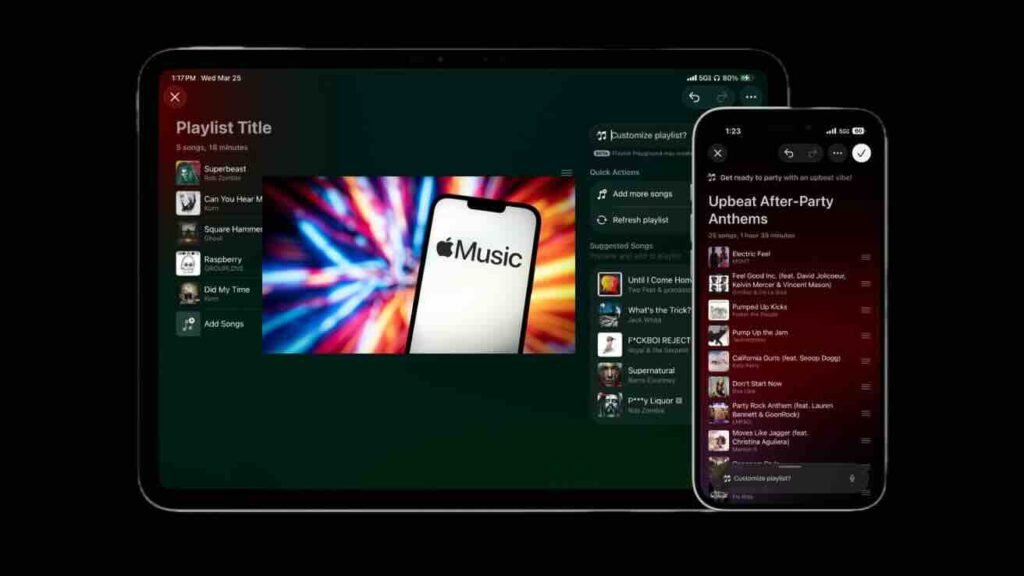
Playlist Playground is Apple’s prompt-based playlist generator. Instead of manually adding songs one by one, you describe what you want—mood, activity, vibe—and the AI builds a 25-song playlist around your request. What makes it different from Apple’s existing personalized mixes? Control. Those curated stations are great, but you can’t tell them “I want 90s alternative for a long drive.” Now you can.
📱 Availability iOS 26.4 / iPadOS 26.4 on iPhone and iPad, plus Android via Apple Music app. US beta for English-language subscribers. (No macOS version yet—grab your iPhone or iPad.)
✨ How to Create Your First AI Playlist (Step by Step)
On iPhone:
1. Open Apple Music → 2. Tap Library → 3. Tap the + (New Playlist) button → 4. Tap the Playlist Playground field → 5. Type your prompt or choose a suggestion → 6. Tap Generate → 7. Tap Done to save.
On iPad:
Tap New Playlist in the sidebar → follow the same flow.
✅ The playlist saves instantly with an auto-generated title, and you can share, edit, or download it just like any other playlist.
🎨 How to Write Prompts That Actually Work
Broad prompts give safe, predictable results. To unlock the magic, combine activity + vibe + context. Here’s what the data shows works best.
🍎 Apple’s Starter Prompts
“Morning coffee music”
“Hip-hop party songs”
“Disco songs that defined the 1970s”
🎯 Activity & Vibe
“Late-night electronic with no vocals”
“90s alternative for a long solo drive”
“Focus music for writing tech blog posts”
“High-energy Phonk for a heavy lifting session”
🌙 Hyper-Specific Aesthetic
“Dark academia piano for studying in a library”
“Songs that feel like a neon-lit rainy night in Tokyo”
“Cottagecore folk for a rainy afternoon”
🔄 Refinement / Iteration
“Make it more upbeat”
“Include more deep cuts, fewer hits”
“Replace the slow songs with high-tempo tracks”
Pro tip: The AI favors well-known tracks at first. To get deeper cuts, combine a specific artist with a mood (e.g., “Radiohead-style tracks for a moody walk”). Iterate 2-3 times for the perfect mix.
📊 Real-World Performance: What Works & What Doesn’t
• Generates coherent on-theme playlists instantly.
• Understands vibe-based and contextual prompts.
• Fast iteration—5 variations in minutes.
• Seamless Apple Music integration.
• Favors well-known tracks (needs specific prompts).
• No bulk editing on iPhone/iPad (manual delete).
• No cover art generation (missed Image Playground tie-in).
• Broad prompts = predictable results.
🎯 Apple Music AI Playlist vs Spotify AI Playlist: Head-to-Head
Based on search trends, this is the comparison readers want most. Here’s how Apple’s Playlist Playground stacks up against Spotify’s AI Playlist beta—across features, availability, and real-world performance.
| Feature | Apple Music Playlist Playground | Spotify AI Playlist |
|---|---|---|
| Launch date | March 2026 (iOS 26.4) | April 2024 (beta, UK/AUS first) |
| Availability | US only (English), iPhone/iPad/Android | UK, Australia, US (select users), mobile only |
| Prompt style | Mood, activity, genre, aesthetic | Mood, activity, genre, “vibe” |
| Song output | 25 songs per generation | Varies (typically 20-30) |
| Iteration/refinement | ✅ Yes, can refine after generation | ⚠️ Limited (regenerate, not refine) |
| Personalization | Pulls from your listening history + trends | Strong personalization based on listening history |
| Deep cuts tendency | Favors popular tracks (needs specific prompts) | Similar—both favor mainstream without detailed prompts |
| Platform integration | Built into Apple Music playlist flow | Separate beta section within Spotify |
| Android support | ✅ Yes (via Apple Music app) | ✅ Yes |
| Mac/desktop support | ❌ Not yet (iOS/iPadOS only) | ❌ Mobile only |
🧠 How Personalized Music Recommendations Work (Apple Music vs Spotify)
One of the top related searches is “personalized music recommendations”—users want to understand the engine behind AI playlists. Here’s a breakdown of how both services learn your taste.
🍎 Apple Music’s Recommendation Engine
Data sources: Listening history, play counts, “Love” and “Suggest Less” feedback, library additions, and curated station interactions.
AI features: Playlist Playground (prompt-based), personal stations (Your Name Station, Discovery Station), weekly mixes (Chill, Get Up!, Friends).
Unique twist: Human-curated editorial playlists blend with algorithmic recommendations. Spatial Audio and lossless streaming are included at no extra cost.
🎧 Spotify’s Recommendation Engine
Data sources: Listening history, skip rates, playlist additions, search behavior, and collaborative filtering (what similar users listen to).
AI features: AI Playlist (beta), Daylist, Discover Weekly, Release Radar, and DJ (AI voice commentary).
Unique twist: Spotify’s algorithm is famously aggressive—it learns quickly but can sometimes overshoot into repetitive suggestions. DJ feature adds human-like commentary.
Real-world take: Both services deliver excellent personalized recommendations. Apple Music leans into human curation + AI, while Spotify bets almost entirely on algorithmic discovery. If you value editorial context (like album notes and radio-style curation), Apple Music shines. If you want relentless discovery and the DJ feature, Spotify leads.
🎼 20+ Apple Music Tips You Should Know (Beyond Playlist Playground)
🎟️ Find live shows near you: iOS 26.4 adds a Concerts tab inside Search (Bandsintown + Ticketmaster). Artist pages show “Upcoming Concerts”.
🔁 Master playlist sharing: Profile icon → View Profile → Edit → control visibility. Collaborative playlists: tap person+icon. Nearby sharing: Settings > Apps > Music > Shared Listening.
🎧 Audio quality: Spatial Audio with Dolby Atmos & Lossless (24-bit/192 kHz). Go to Settings > Apps > Music > Audio Quality. Hi-Res Lossless uses ~145MB per song—adjust per network.
📻 Personal stations: Your Name Station (library faves) + Discovery Station (new music). Mood stations: Home tab > Stations For You.
🎤 Apple Music Sing: Adjust vocal volume (microphone+sparkle icon). Use iPhone as mic with Apple TV 4K for karaoke nights.
📈 Replay year-round: Scroll to bottom of Home section for yearly Replay playlists & listening stats.
📱 TikTok integration: Link Apple Music, tap “Play Full Song” to hear full tracks without leaving the app.
📱 Apple Music New Features in iOS 26.4: Beyond Playlist Playground
The “Apple Music new features” search query tells us users want the full picture. Here’s everything that arrived in the latest update.
✨ 1. Playlist Playground – AI prompt-based playlist generator (the star of this guide).
🎟️ 2. Concerts Discovery – Find live shows by location, genre, or date via Bandsintown + Ticketmaster integration.
📱 3. TikTok Full Song Playback – Link accounts to hear full tracks without leaving TikTok.
🎤 4. Enhanced Apple Music Sing – Use iPhone as mic with Apple TV 4K for karaoke.
🔊 5. Music Haptics Expansion – More tracks supported for tactile audio feedback.
📊 6. Replay Improvements – More detailed monthly listening stats.
🔗 7. Shared Listening Enhancements – Better nearby discovery and collaborative controls.
🤖 AI Music Generation: Where Playlist Playground Fits
Search data shows interest in broader “AI music generation.” It’s worth clarifying: Playlist Playground generates curated playlists from existing music—it does NOT generate new songs or AI-made audio. That’s a different category (Suno, Udio, etc.).
💡 Quick clarification: “AI playlist” = smart curation of existing songs. “AI music generation” = creating new audio from text prompts. Playlist Playground is the former.
If you’re looking for AI that creates original music, tools like Suno and Udio lead the space. Apple Music’s approach is different: it uses AI to curate from its 100M+ song catalog, not to invent new audio. This makes sense for a streaming service—users want discovery, not synthetic audio (yet).
⚖️ Quick Comparison: Apple Music vs Spotify AI Tools
| Feature | Apple Music (Playlist Playground) | Spotify (AI Playlist) | ChatGPT + Manual |
|---|---|---|---|
| Platform | iOS, iPadOS, Android | iOS, Android, Web | Anywhere |
| Pricing | Included in Apple Music ($10.99/mo) | Included in Spotify Premium ($11.99/mo) | Free tier available |
| Prompt types | Mood, activity, genre, aesthetic | Similar | Unlimited, but no integration |
| Iteration | Refine after generation | Limited | Full control, manual export |
| Deep cuts | Favors popular tracks (requires specific prompts) | Similar | Depends on user curation |
🚫 Common Mistakes to Avoid
❌ Vague prompts: “Sad music” gives Adele hits. “Melancholy indie folk with fingerpicked guitar” gives depth.
❌ Giving up after one try: generate, refine, generate again.
❌ Not editing manually: treat AI as a starting point, not final.
❌ Forgetting it’s beta: It will evolve—check back for improvements.
🎯 Perfect for:
✔ Apple Music subscribers wanting faster playlist creation.
✔ Vibe-based curators who don’t want to spend hours.
✔ Anyone stuck staring at an empty playlist.
✔ Users who like discovery but want a coherent base.
⛔ Probably not for:
✘ People with meticulously curated playlists who dislike AI assistance.
✘ Extremely niche genre listeners (data may be limited).
✘ macOS-only users (for now).
✘ Users outside US English beta region.
❓ FAQ: Your Apple Music AI Playlist Questions, Answered
🌸 Final Thoughts: A Promising Start
Playlist Playground won’t replace carefully curated playlists from music lovers who enjoy the craft. But for everyone else—and even as a starting point for curators—it’s genuinely useful. The core experience is solid: being able to say “late-night electronic with no vocals” and get a coherent 25-song mix in seconds is the kind of practical AI integration that actually improves the user experience.
In real-world use, I’ve found that mixing prompts with an artist reference yields the most playable results. If you’re on a budget, Apple Music’s $10.99 subscription now packs even more value. For users in the US, it’s a playground worth exploring—and for those outside, patience will pay off as Apple rolls out the beta globally.
Whether you’re team Apple Music or team Spotify, AI playlists are here to stay. The “apple music ai playlist” search isn’t going away—and now you have the complete guide to master it.