

The 5-Minute Verification Checklist: How to Spot AI Clones in 2026
In an era where AI can mimic your boss’s urgent voice memo or your grandchild’s tearful video call, it’s no wonder anxiety is running high. Deepfake scams—using AI-generated audio and video to impersonate loved ones or colleagues—are surging, with losses from voice cloning fraud projected to hit $40 billion globally by 2027. From “grandparent scams” where fraudsters pose as family in distress to workplace cons tricking employees into wire transfers, these attacks exploit our trust in familiar voices and faces. The good news? You don’t need fancy tech to protect yourself. This quick checklist draws on expert-recommended tactics to verify authenticity in under five minutes—focusing on practical steps like safe words, sensory checks, and cross-verification.
How to Choose the Right Free Tool:
| Your Need | Recommended Free Tool |
|---|---|
| Quick check of a suspicious video | AI or Not (5 free/month) |
| Technical analysis for investigation | Hugging Face Spaces + Forensically |
| Checking voice messages | Play.ht AI Voice Detector |
| Journalistic verification | InVID Plugin + WeVerify |
| Checking certified/provenance content | Content Credentials Verifier |
| No installation, maximum privacy | Human analysis + checklist above |
Audio-Visual Deepfake Detectors
6. AMD’s Deepfake Detection Prototype
- Best for: Synchronization analysis between audio and video
- Free access: Available through research partnerships and demos
- Key insight: Detects mismatches between lip movements and audio phonemes
- Availability: Check AMD’s AI research page for current demo access
7. Audio Deepfake Detectors (for voice verification)
A. Resemble AI’s Detect
- Free API access tier (limited calls)
- Specializes in AI-generated voice detection
B. Play.ht AI Voice Detector
- Free web tool for uploaded audio samples
- Good for detecting ElevenLabs, Murf, and other voice clones
Immediate Detection: Free Real-Time Tools
1. AI or Not
- Best for: Quick, browser-based analysis
- Free tier: 5 free checks per month, no signup required
- Strengths: Simple drag-and-drop interface, detects AI-generated faces and videos
- Limitations: Limited monthly checks, may struggle with high-quality deepfakes
- Link: aiornot.com
2. Hugging Face Deepfake Detection Spaces
- Best for: Technical users and developers
- Free tier: Completely free via Gradio interfaces
- Available models:
- Microsoft Video Authenticator (research preview)
- Deepware Scanner API demo
- Various academic models (DFDC, FaceForensics++)
- Strengths: Access to cutting-edge research models, completely free
- Limitations: Requires some technical understanding, slower processing
3. Deepware AI Detector
- Best for: Balancing ease of use with accuracy
- Free tier: Unlimited scans via web interface
- Strengths: Specifically trained on deepfake pornography (important for moderation)
- Limitations: May have higher false positives on non-pornographic content
- Link: scanner.deepware.ai
Frame-by-Frame Analysis Tools
4. Forensically (FotoForensics)
- Best for: Detailed technical analysis of video frames
- Free tier: 100% free web tool
- Key features:
- Error Level Analysis (ELA) for compression artifacts
- Clone detection for duplicated regions
- Metadata extraction and analysis
- How to use: Extract frames from video → analyze individually
- Link: fotoforensics.com
5. InVID Verification Plugin
- Best for: Journalists and fact-checkers
- Free tier: Completely free browser extension
- Strengths: Reverse video search, thumbnail analysis, metadata checking
- Limitations: More focused on verification than pure AI detection
- Works with: YouTube, Facebook, Twitter, Instagram
- Link: invid-project.eu/tools-and-services/invid-verification-plugin/
Check if video is AI-generated online free
Your 5-Minute Verification Checklist to check if video is ai-generated online free . You should run through these steps the moment something feels off—whether it’s a voice message claiming an emergency or a video call requesting sensitive info.
Assess for Urgency and Behavioral Red Flags (30
- seconds).Pause and evaluate the context. Does the call provoke fear, outrage, or a rush to act, like “Send money now—I’m in trouble!”? Scammers thrive on emotion to bypass logic. Ask yourself: Is this typical behavior? Would your boss really demand a wire transfer via voice note without protocol? If it’s a family member, note if they use unusual phrasing or avoid personal details. Tip: Pre-establish family or team “safe words”—a unique phrase only insiders know, like an inside joke not shared online. If they can’t provide it, hang up.
Scan for Visual Artifacts in Video (1 minute)
- If it’s a video call, zoom in on details AI still bungles. Look for unnatural blinking (too rigid or absent), mismatched skin tones, odd lighting/shadows that don’t align with the environment, or facial jitter when they move quickly. Eyes might not reflect light realistically, or expressions could seem rubbery. For pre-recorded videos, reverse-search frames using tools like Google Images to check origins.
- Listen for Audio Mismatches (1 minute)
In voice messages or calls, tune into sound quality. Synthetic voices might have robotic cadence, unnatural pauses, or “too perfect” pronunciation without background noise. Check lip-sync: Does the mouth movement match the words exactly? Tools like Resemble.ai or AI Speech Classifier can analyze clips quickly if you have time, but your ear is a strong first line - Verify Via a Second Channel (1 minute)
Don’t act on the call alone—hang up and contact them through a trusted method, like their known phone number or secure app. For work, use company protocols like multi-factor authentication (MFA) or email confirmation. In family scenarios, text or call a mutual contact to confirm. This simple step has thwarted countless scams. - Challenge with a Live Proof or Personal Question (1 minute)
Test interactivity: Ask them to hold up a specific number of fingers, recall a recent shared memory not online, or answer a pre-agreed security question. Real-time deepfakes might glitch under pressure. If it’s audio-only, request a switch to video. No compliance? End the interaction.
Beyond the Checklist: Proactive Steps
- Set Up Safe Words Now: Gather your family or team offline to choose phrases—avoid anything guessable from social media.
- Use Tech Aids: Apps like Deepware Scanner or provenance tools (e.g., C2PA standards) can embed authenticity markers in media.
- Stay Informed: Follow updates on detection advances, as AI forensics improve daily.
- Report Suspicious Activity: If scammed, alert authorities like the FTC or your bank’s fraud team immediately—document everything for recovery.
Deepfakes are scary, but armed with this checklist, you’re not helpless. Share it with your network to build collective defense. Remember, the best scam is the one that never succeeds—stay sharp out there.
Quick Phishing Protection Checklist
Use this step-by-step guide whenever you encounter a suspicious message. It takes just minutes to verify and protect yourself.
- Spot Red Flags Immediately (30 seconds)
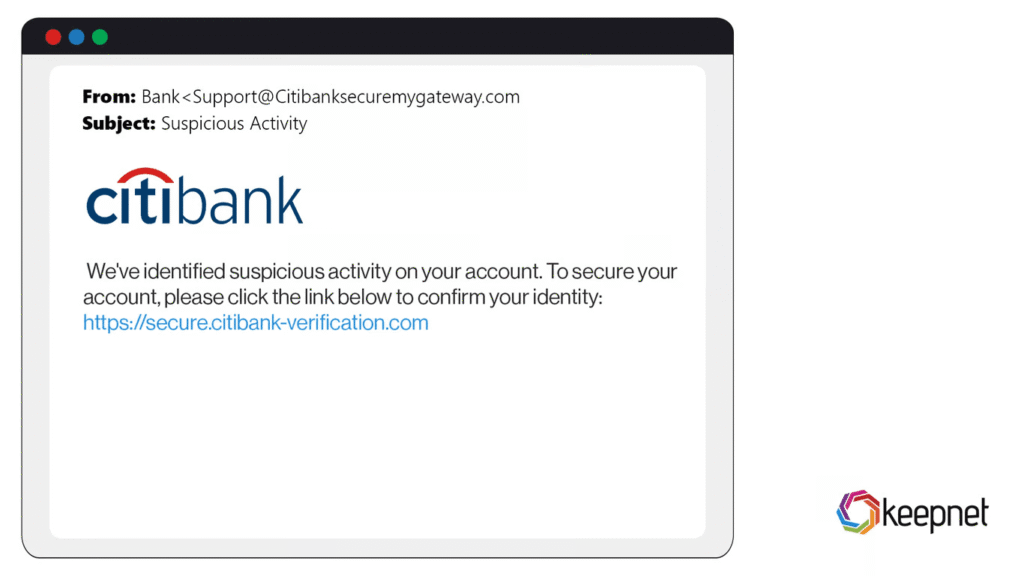
Look for urgency, like “Act now or your account will be suspended!” or threats of consequences. support.microsoft.com Check the sender’s email address for mismatches (e.g., “support@amaz0n.com” instead of “amazon.com”). hoxhunt.com Hover over links without clicking to see the real URL—does it match the claimed site? Avoid opening attachments from unknown sources. If it feels off, it probably is.Here’s what a typical phishing email might look like:
- Verify the Source Through a Second Channel (1 minute)
- Don’t respond directly. Instead, contact the supposed sender using a known phone number or website (not the one in the message).
For example, if it’s a bank alert, log in via their official app or site. This simple step exposes fakes quickly.
- Enable Multi-Factor Authentication (MFA) Everywhere (Setup: 2 minutes)
- Use Strong, Unique Passwords with a Manager (Ongoing)
- Install and Update Security Software (Setup: 5 minutes)
Leave a Reply