


As team lead with great team members, I keep going back and forth between Windsurf AI and Cursor AI. Right now, I’m on Cursor and really enjoying its Agent Mode, though Windsurf isn’t far behind. In some ways, I actually prefer how Windsurf handles interaction. Thats all about it when it comes to cursor vs windsurf , no matter how deep you dive in reviews.
What’s surprised me most is how similar working with an AI developer feels to working with a human one.
Recent update Dec 2025 about Windsurf Goals so keep this in view
Windsurf’s Recent Push into Parallel/Multi-Agent Workflows (Wave 13 Update)
- Just before Christmas 2025, Windsurf dropped a major update with true parallel agents (using Git worktrees to run multiple agents simultaneously without conflicts), multi-pane views, a dedicated terminal for reliable execution, and free access to their proprietary SWE-1.5 model for three months.
- This makes it exceptionally strong for team-scale or complex projects where you want multiple AI “threads” handling bugs, features, or refactors in isolation.
- If you’re working on larger/monorepo codebases or collaborating, this is a game-changer that Cursor doesn’t match yet (Cursor’s agents are more single-threaded and approval-focused).
| Feature | Windsurf AI | Cursor AI |
|---|---|---|
| Core Experience | Web-based, cloud IDE | Desktop application (VS Code fork) |
| Primary Focus | Agentic, autonomous task execution | Deep IDE integration & codebase awareness |
| Best For | Rapid prototyping, brainstorming | Large project development, refactoring |
| Learning Curve | Lower, more conversational | Higher, requires understanding its commands |
With Windsurf vs cursor understabdable differences, i feel that Windsurf AI is an AI-native code editor designed around autonomous agents, not chat prompts. It looks similar to VS Code, but the similarity stops there. Windsurf treats AI as the default actor. It suggests changes, fixes bugs, and navigates the codebase proactively—often before you ask.
You can read our competitor study of Cursor Ai vs its competitors
In short: cursor vs windsurf is how you want it to be Windsurf AI leads, you supervise.That makes Windsurf feel fast, powerful, and occasionally reckless. Cursor AI on the other hand takes the opposite approach. It’s a VS Code–based editor with AI layered on top, designed to enhance—not replace—existing workflows. You summon AI when needed. You stay in control. Nothing happens without your approval.
In my view Cursor AI feels less futuristic, but far more predictable.
Windsurf AI vs Cursor AI – Reasonable Differences
Quick-Reference Comparison Table for Windsurf Ai vs Cursor Ai
| Feature | Windsurf AI | Cursor AI | Key Takeaway |
|---|---|---|---|
| Core Philosophy | AI leads; you supervise. Autonomous, fast. | You lead; AI assists. Controlled, predictable. | Windsurf is for speed, Cursor is for control. |
| Best For | Fast prototyping, debugging, greenfield projects. | Production code, team environments, stable workflows. | Choose based on your project’s stage and risk tolerance. |
| Pricing Feel (2025) | “Metered” (~$20/mo Pro, but Turbo tasks are capped). | “All-inclusive” (~$20/mo Pro, effectively unlimited). | Cursor’s model is more psychologically worry-free. |
| Debugging Workflow | Automatic error detection with one-click fixes. | Manual copy-paste of errors into chat for solutions. | Windsurf’s biggest tangible time-saver. |
| Ideal User | Solo developers, fast movers, early-stage startups. | Teams, engineers on critical systems, VS Code loyalists. | Windsurf bets on the future; Cursor perfects the present. |
Core Philosophy differes as Cursor AI upgrades your workflow while Windsurf AI Coding replaces it. Cursor behaves like a careful senior engineer. Windsurf behaves like an eager AI agent that assumes intent and moves fast.
Whether that’s a strength or a liability depends on what you’re building.
How do developers respond to Windsurf AI & Cursor AI
What Devs Are Saying on X (Twitter) About Windsurf vs. Cursor AI
The dev community on X is pretty split—no clear winner, but opinions boil down to workflow, codebase size, UI polish, and pricing. Here’s the real talk from recent posts (paraphrased for clarity, but staying true to the vibe):
- Many switch to Windsurf for larger codebases: “Cursor wowed me for 3 days, then got confused on big repos. Switched to Windsurf in 20 mins—handled it easily, zero learning curve since both are VS Code forks.” (High-engagement post from a YC partner.)
- Windsurf praised for agentic flow and simplicity: “Windsurf is so much better—easier steps, auto-previews, just prompt and walk away. Perfect for prototyping when bored.” “Windsurf’s Cascade just gets what I’m doing—deeper context awareness.” “Hate to say it, but Windsurf has been far superior lately.”
- Cursor wins for precision and UI tasks: “Cursor crushes documentation digs and complex rules. Better for UI refinement—readability, alignment, UX details.” “Cursor’s planning actually understands the project. Helps me ship fastest.” “Still prefer Cursor—tried Windsurf, wasn’t impressed.”
- Strengths per tool: Windsurf → large-scale refactoring, auto-context/indexing, cleaner UI, better pricing/value. Cursor → code quality, control, autocomplete speed, solo/power user tasks.
- Common theme: Try both, switch per project: “Been bouncing between them—both solid in different ways.” “Each has strengths. Use what fits the task.” “No moat—users switch to whichever’s best right now.”
- Pricing mentions: Windsurf seen as cheaper/more generous (e.g., unlimited on fast models), Cursor pricier with metered credits.
Overall sentiment: Windsurf gaining fast on polish and big-repo handling, but Cursor still has loyal fans for quality and familiarity. Most devs recommend testing both on your own code—no lock-in.
What’s your take? Tried either lately?
Broader 2025 Context
From recent reviews and discussions (across sites like Builder.io, Qodo, Reddit threads, and direct comparisons):
- Opinions are evenly split → ~50/50, just like our two queries suggest.
- Windsurf often wins praise for UI polish, large-repo context (auto-handling), agent autonomy, and speed in prototyping/enterprise features.
- Cursor gets nods for precision, control, code quality, and seamless VS Code integration.
- Many devs use both or switch based on the task—no clear “Cursor killer” or dominant tool.
Interface & Daily UX
Cursor
- Nearly identical to VS Code
- Zero learning curve
- Clear separation between code and AI
Windsurf
- AI suggestions surface automatically
- Strong understanding of the entire codebase
- Encourages natural-language questions like “Where is auth handled?”
My programmer friends differs this in a very peculiar way. he says. Comfort coding is with Cursor but inntelligence is built in Windsurf
Pricing factors Windsurf vs Cursor : Individual Plans
| Plan | Windsurf | Cursor |
|---|---|---|
| Free | $0/mo • 25 prompt credits/mo • Unlimited Tab completions & inline edits • Basic models + trial features | Hobby: $0/mo • Limited Agent requests • Limited Tab completions • One-week Pro trial |
| Entry Paid | Pro: $15/mo • 500 prompt credits/mo • Add-ons: $10 for 250 extra • Unlimited completions/edits • All premium models + SWE-1.5 | Pro: $20/mo • Extended Agent limits • Unlimited Tab • Max context windows |
| Mid-Tier | N/A | Pro+: $60/mo • 3x usage on premium models (OpenAI, Claude, Gemini) |
| High-Tier | N/A | Ultra: $200/mo • 20x usage on premium models • Priority features |
Team / Enterprise plans Widnusrf vs Cursor Ai
| Category | Windsurf | Cursor |
|---|---|---|
| Teams | $30/user/mo • 500 credits/user/mo • Centralized billing, analytics, priority support • SSO +$10/user/mo | $40/user/mo • Centralized billing • Analytics, privacy controls, SSO |
| Enterprise | Custom (up to 200 users: contact; >200: unlimited credits included) • RBAC, dedicated support, hybrid deploy | Custom • Pooled usage, invoice billing, SCIM, audit logs, granular controls |
Agent Mode: The Deciding Factor
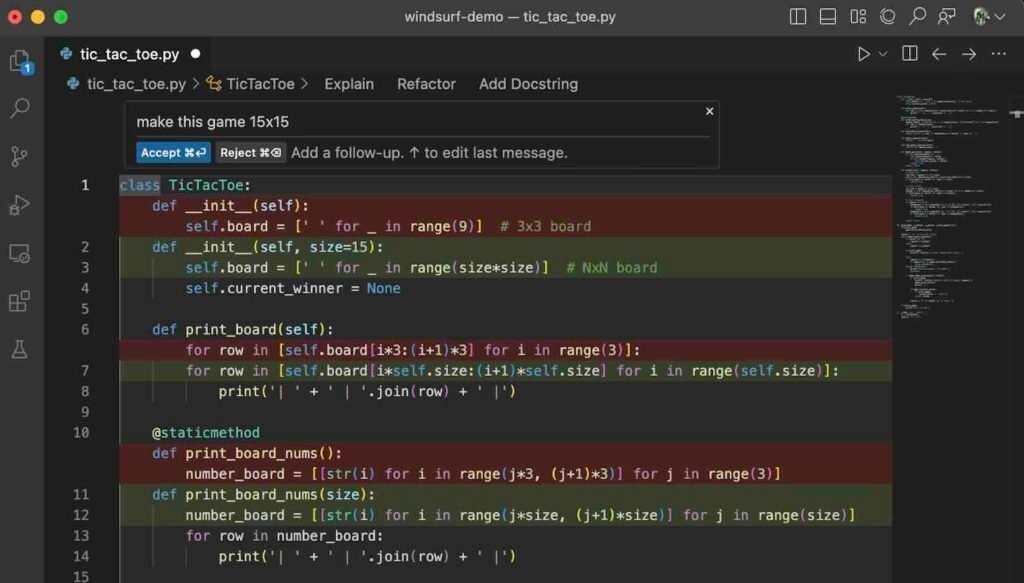
When I use Cursor AI, the agent behaves like a careful teammate. It asks questions, plans each step, and doesn’t rush into changes. That makes it slower, yes—but much safer when I’m working on production code or anything I can’t afford to break.
Windsurf Ai feels very different. Its agent assumes what I want and moves fast. That speed is great when I’m starting something new or experimenting, but it also means I have to stay alert. I always review what it does, because it can make confident—but wrong—choices.
My usage is simple:
- For large, critical codebases, I stick with Cursor AI
- For fast prototyping and greenfield projects, Windsurf is hard to beat
It really isn’t about which tool is better. It’s about which one makes sense for the work you’re doing at that moment.
With Cursor, the agent slows things down in a good way. It asks questions, thinks through each step, and avoids risky changes. That caution makes it a better fit for production code, even if it means progress feels a bit more measured.
Windsurf takes the opposite approach. It assumes intent and acts immediately. That speed is great when you’re starting fresh or experimenting, but it also means you need to keep a close eye on what it’s doing and review everything it touches.
Different tools, different situations—and that’s the real deciding factor.
Verdict
- Large, critical codebases → Cursor
- Fast prototyping → Windsurf
Code Generation & Autocomplete
Both are strong. The difference is scope.
- Cursor is slightly faster and more precise at the file level
- Windsurf understands relationships across the entire project
Benchmark takeaway
- Cursor responds ~0.5–1s faster
- Windsurf is smarter across files
Debugging: Windsurf’s Biggest Win
This is where Windsurf clearly wins.
Cursor
- Manual copy-paste of errors
- Solid explanations
- Traditional workflow
Windsurf
- Automatically detects terminal errors
- One-click fixes
- Analyzes stack trace + full codebase
If you debug often, Windsurf saves real time. This isn’t a gimmick—it’s genuinely useful.
Windsurf Ai pricing vs Cursor AI Pricing
Windsurf AI Pricing (2025)
- Free: limited Turbo tasks
- Pro (~$20/month): unlimited chat, capped Turbo
- Team (~$40/user)
⚠️ Turbo tasks run out fast if you rely heavily on agents.
Cursor AI Pricing (2025)
- Free: usable autocomplete + limited chat
- Pro (~$20/month): effectively unlimited
- Team (~$30/user)
Psychological difference
- Cursor feels unlimited
- Windsurf feels metered
That matters more than people admit.
Pros & Cons (No Sugarcoating)
Windsurf AI Pros
- Agentic workflows feel genuinely next-gen
- Best-in-class debugging
- Strong codebase-wide awareness
Windsurf AI Cons
- Turbo task anxiety is real
- Agents can be overconfident
- Smaller extension ecosystem
- Steeper learning curve
Cursor AI Pros
- Predictable pricing
- Mature VS Code ecosystem
- Safer for teams and production
- Faster autocomplete
Cursor AI Cons
- Less proactive AI
- Manual debugging
- Less experimental
Who Should Use What?
Go with Windsurf AI if you move fast—prototyping, fixing bugs, or working solo where speed matters more than safety nets. It’s great when you want AI to take initiative.
Stick with Cursor AI if you’re maintaining production code, working with a team, or need stability and predictable costs. It fits better when reliability and existing VS Code tools are non-negotiable.
Final Verdict: Is Windsurf AI a Cursor Killer?
No—and it’s not supposed to be.
Windsurf doesn’t replace Cursor. It challenges the idea that developers should always be in control. Cursor perfects what already works. Windsurf bets on what comes next.
The smart move in 2025 isn’t choosing one.
It’s knowing when each editor makes sense.
- Use Windsurf for speed, debugging, and new projects
- Use Cursor for focus, stability, and production work
That’s the real answer—whether marketing likes it or not.
Cursor vs. Windsurf: Quick FAQs
1. What’s the main difference between Cursor and Windsurf? Cursor gives you tight control—manual context, precise edits, powerful agent mode. Windsurf is more “agentic”—Cascade auto-manages context, runs commands, and keeps you in flow with less babysitting.
2. Which one writes better code? Cursor usually edges out on quality and fewer hallucinations, especially with Claude. Windsurf is plenty good and faster, but I often need one extra iteration on tricky stuff.
3. Which feels better to use day-to-day? Windsurf. Cleaner UI, snappier, less cluttered. Cursor has more knobs and buttons—great when you need them, overwhelming when you don’t.
4. How do the pricing plans stack up right now? Windsurf is cheaper and more generous. Solid free tier, Pro around $15/mo with basically unlimited use on their fast SWE-1.5 model. Cursor starts at $20/mo and burns through credits quick if you lean on premium models.
5. What about large codebases? Windsurf handles them smoother thanks to auto-indexing and Cascade pulling context without me telling it what files to look at. Cursor works fine but you’re constantly adding files manually.
6. Autocomplete and speed? Cursor’s inline completions are smarter and longer. Windsurf feels faster overall—launch, inference, less lag—even on modest hardware.
7. Which agent mode is actually better? Windsurf’s Cascade still leads for hands-off tasks. Cursor’s agent is catching up fast and gives more control when you want to steer it.
8. Free tier worth using? Yes—Windsurf’s free tier is legitimately usable every day. Cursor’s free tier runs out quick once you start doing real work.
9. Enterprise or team use? Windsurf. Better security story, per-seat pricing that doesn’t explode, and admin controls teams actually need.
10. So which one should I pick?
- Pick Cursor if you love fine-grained control, want the absolute best code quality, and don’t mind paying more.
- Pick Windsurf if you want speed, polish, better pricing, and a more automated workflow.
Honestly, try both for a week on your own codebase. Most of us end up preferring one strongly once we feel the difference in daily flow.
Your turn—which one are you leaning toward and why?
Leave a Reply